Watch now! Puerto Rico VEX Robotics League Play Event #3!
Hi everyone, Today, November 6, 2016, we are live streaming the 3rd Puerto Rico VEX Robotics League Play Event. You can watch it over here: Enjoy! Post Views: 1
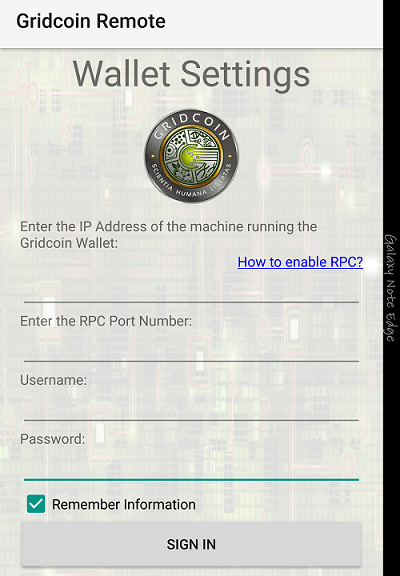
Hi everyone! Today, I’m going to talk to you about my newest app, Gridcoin Remote. Gridcoin Remote is an app that allows you to access your Gridcoin Wallet in your PC right from your Android Device. It is as simple as entering your PC IP Address, Port Number, Username and Password, and that’s it! Log in and see your wallet details. You can see your Balance and Address, along with other useful network information. Features: Connect to your Gridcoin Wallet…
Hi everyone, On October 23, 2016, Puerto Rico held the second VEX Robotics official League Play Event, called the “Liga Puertorriqueña de Robotica VEX”, where VEX Robotics teams across all Puerto Rico comes to compete. This 2016-2017 season game is called “Starstruck”. You can find more information of the game here. The event consisted of 33 Matches. You can watch them right here. Enjoy!!! Match Schedule: Match 1: Match 2: Match 3: Match 4: Match 5: Match 6: Match 7: Match…
Hi everyone, On October 9, 2016, Puerto Rico held the first VEX Robotics official League Play Event, called the “Liga Puertorriqueña de Robotica VEX”, where VEX Robotics teams across all Puerto Rico comes to compete. This 2016-2017 season game is called “Starstruck”. You can find more information of the game here. The event consisted of 26 Matches. You can watch them right here. Enjoy!!! Match 1: Match 2: Match 3: Match 4: Match 5: Match 6: Match 7: Match 8:…
Hi everyone! In this post I’ll talk to you about the amazing Gole1 Mini PC. The Gole1 Mini PC can be considered a hybrid PC, as you can use it as a desktop or as a tablet. You can even use it as a secondaty monitor while using it as a desktop replacement! The Gole1 offers 3 USB 2.0 ports, 1 USB 3.0 port, 10/100 Ethernet port, HDMI port, Headset jack, MicroSD port, Wireless A/B/G/N/AC connectivity, and an Intel Atom…
Hi everyone! Here is my new Mini-ITX system I built to mine Gridcoin and crunch lots and lots of BOINC workunits 🙂 Specs: OS: Windows 10 Motherboard: Jetway NF9G-QM77 CPU: Intel i7-3610QM GPU: EVGA Nvidia GTX 1060 3GB SC PSU: EVGA 600W RAM: 16GB DDRL SODIMM Hard Drives: -128GB SSD mSATA -80GB HDD for virtual machines -1TB HDD for data Optical Drive: Lite-On iHAS524 with SmartErase and LabelTag functionalities. Wifi/Bluetooth mini-PCIe Module Post Views: 6
Hi everyone, It is time to show you yet another Single Board Computer (or SBC, for short). This time, I’ll show you the JaguarBoard. It is a little computer that houses an Intel Atom Z3735G clocked at 1.33Ghz with Turbo Boost to 1.83Ghz. It also has 1GB of RAM and 16GB eMMC Storage, which is perfect to install Windows 10 32bit Edition. However, installing Windows 10 is not straightforward since this machine has 2 different BIOS, of which one is…
Hi everyone! So I finally got my UP Board! This is the 2GB of RAM and 32GB eMMC Storage. So far, I’m impressed with it. The CPU runs pretty cool at 1.66Ghz out of the stock 1.44Ghz, so that’s 222Mhz boost, and also the GPU runs at a constant 500MHz both at 100% when running BOINC (Berkeley Open Infrastructure for Network Computing). The UP Board doesn’t come with an OS preinstalled, so you have to either install Linux or install…
Hi everyone! As you may know, I love BOINC and Gridcoin, and that’s why I made this awesome Gridcoin app for Android and Windows 10. This post focuses in the Android app in which I released v1.2.1 the other days. In case you haven’t noticed this app, Gridcoin Faucets & Tools is an Android app designed to give you access to Gridcoin Faucets (currently there’s only one working faucet) as well as to provide several useful tools. The app features…
Hi everyone, I ask you, how many notebooks have you had in the past? How many notebooks you’ve filled with things that weren’t important? How many pages have you wrote that you no longer need? Would you like to reuse it to write more meaningful things? Meet the RocketBook Wave! A notebook that can be erased by just microwaving it! And yes, it works!! Here are two videos of the RocketBook Wave I made. The first is the unboxing video….